

Explore ProEditor
The ProEditor consists of three main areas: the top bar, the panel, and the canvas.
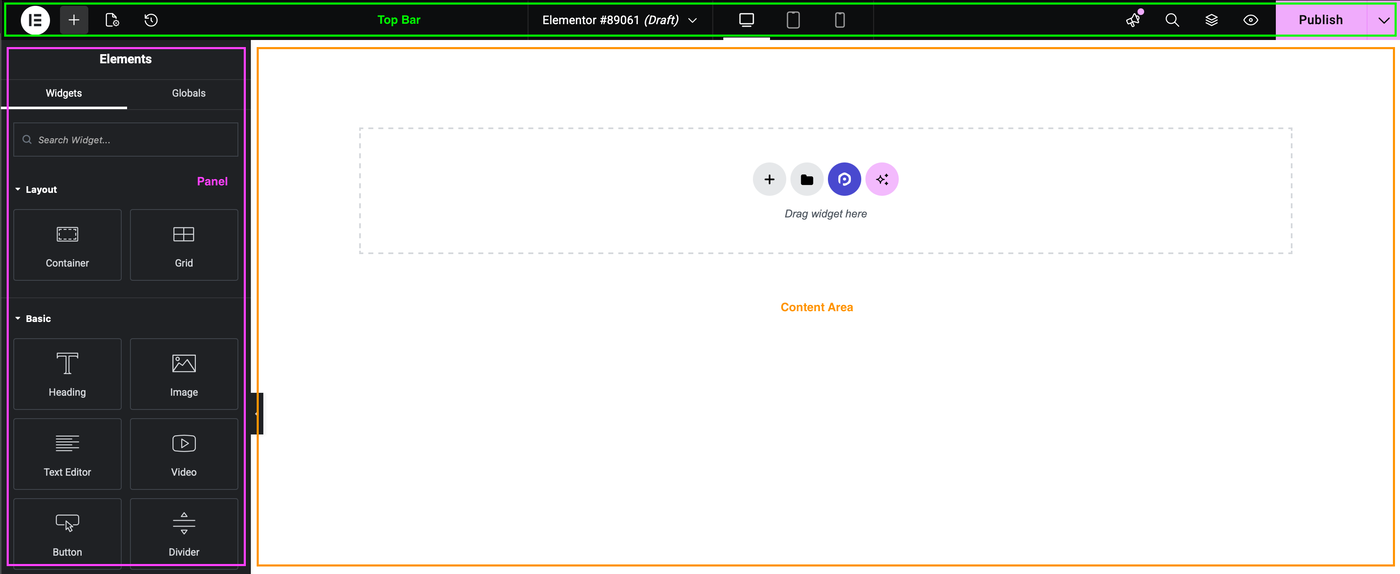
Top Bar
This is where you’ll find the tools and settings you need to build and customize your page. For more details about the options available from the top bar, see, ProEditor Top Bar.
Panel
The panel is where you’ll find the design elements, such as containers, and widgets, such as the Heading widget, used to build your page.
The panel is also where you adjust the settings for elements, pages and the site.
Content Area
This is where you’ll create your page/post/site part. For more details about moving elements from the Panel to the Content Area, see, Creating a Container and Add Elements to the Content Area.